Open source · Markdown · Local First
Kimu
A small and simple Markdown viewer
 Project imageImagen del proyecto
Kimu is a project I made to solve a problem that I think is more and more frequent. Working with Agents, it's common to start reading, reviewing and correcting a ton of local Markdown files. After a while, I started to hate reading the files in plain text (or inside the IDE) instead of a pretty HTML page that's easy to scan. And that's how Kimu was born.
The motivation behind Kimu #
If you'd rather read about what Kimu does, go to the But what is Kimu? section. This section tells the story of how the project was born.
I noticed that the Agent (and me!) starts generating a bunch of Markdown files that I then have to Review (the famous little Human-in-the-Loop). This quickly became a tedious chore I didn't want to do, which I partly blame on how ugly it is to read Markdowns in plain text. And so I started using pandoc to turn the Markdown files into HTML:
pandoc -i input.md -o output.html
The result was a simple HTML file that I could read, but it was still a bit flat, no personality, so I started using water.css to format the files. It was much better, I had local files I could read with a much nicer interface... but even so it wasn't enough:
- If the source Markdown changed, I had to regenerate the HTML by hand, and then reload the page.
- If I wanted to add new features to the CSS, I had to propagate them by hand to all my PCs.
- To avoid adding unnecessary files to my Git projects, I started adding a
docs/*.htmlentry to all my.gitignorefiles, which I'd sometimes forget, which meant that a tired end-of-daygit add . && git commit -m "update docs" && git pushwould end up with an unwanted HTML file in the repo.
Sure, the result was better now:
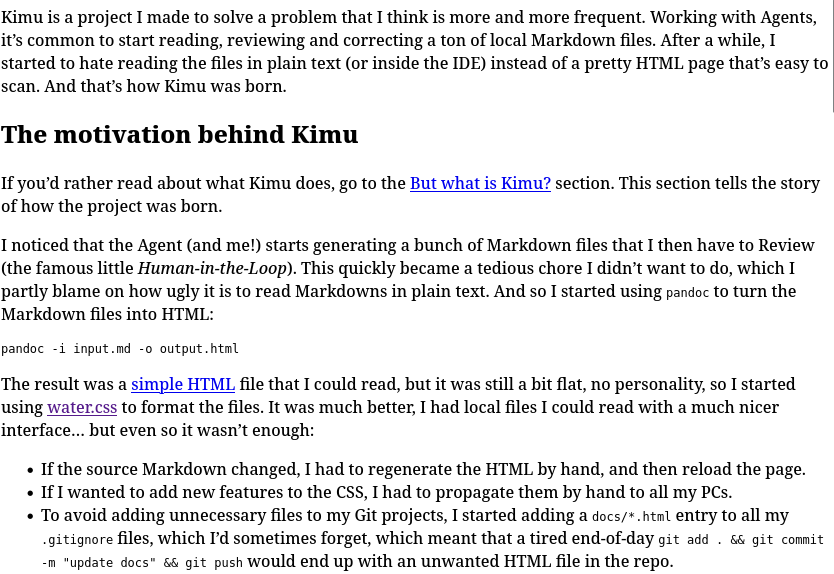
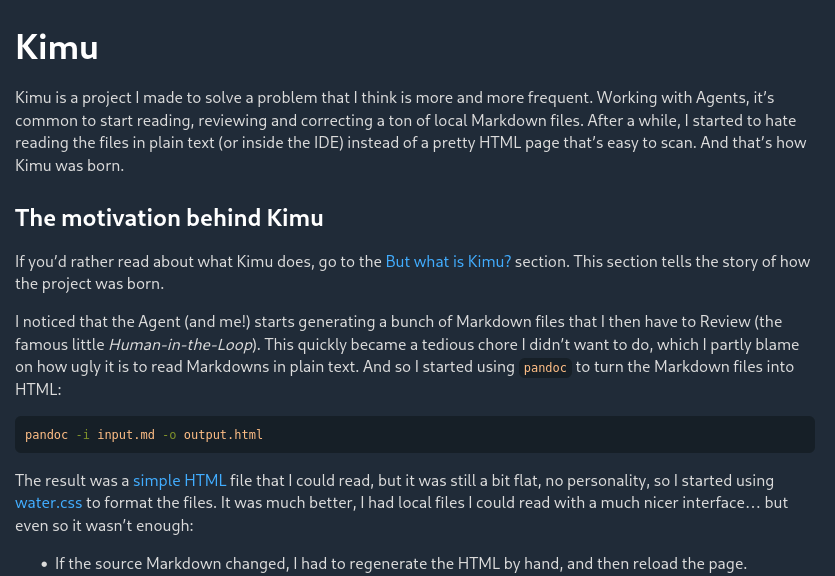
So I got the idea to make a small Markdown viewer. At first it was a tiny mini-project inside my bigger project, Invntry, I did it in one go (one-shot) with an Agent and that was it, it was just a quick tool.
My idea was to have a viewer for the main project I was working on, one I could easily run with a command like uv run docs/serve.py. The problem was that I quickly started adding more and more features to it, so I moved it to its own repo, came up with a name for it and kept adding things. The polished product struck me as so useful, pretty and fast, that I thought maybe the world (or maybe the void??) would benefit a lot from it. I am proud to announce that both my dad and my girlfriend like the app, maybe that's enough.
But what is Kimu? #
Ok, so now we've got the why: I needed to read my Markdown files and I wanted to treat myself to a prettier interface instead of a boring text editor. But what IS Kimu?
The name Kimu #
If you're curious about the name, it's nothing too serious, I needed a placeholder name for the GitHub repo, but I ended up really liking it. I needed something short, so I could do something like kimu docs quickly from the terminal, instead of kimu-beautiful-simple-and-fast-reader docs. And Kimu sounds like Kimün, a Mapuche word that means knowledge. Nice, right?
The logo tried to represent a tree, I was thinking something like how knowledge is like the roots of a tree that keep it strong and standing. I don't know, it's not that deep, but I think the logo turned out pretty enough. Days later, with a quick Google search, I found Kumu, which I think is something like a knowledge base, which also uses a tree with roots as its logo, with a kinda digital idea. Small world, I guess?

Anyway, I was looking for a short word with a meaning close to knowledge, and I found it.
Features #
Ok, and why would I use Kimu?, an astute reader might ask. Well, I think it has a couple of features that make it a very pretty little app, I'll list them and maybe we can discuss them:
- It's offline first: Wonderful, right? You don't need an internet connection to use it, you can go to the middle of the woods, open Kimu and review the mountain of text these agents generate. You'll feel fresh and happy, with its pretty themes.
- It's fast: And I mean really fast. It doesn't give you time to procrastinate, to open social media, nothing: it loads instantly. I like that sooo much. It doesn't even have dependencies, I didn't want to include NPM packages for example. That seems to be a security risk these days. Software turns into a mutant with a thousand dependencies, and since the app is so simple and small, if I need something like a library, the Agent can build it. I don't need anything fancy, just something fast that works.
- It's secure: Offline, no dependencies, and not that much code? Looks secure. A mildly suspicious reader can ask their favorite Agent to review the code if they like (but if they find something, leave me an issue, please).
- Ergonomic: This is one of those features you don't notice until you notice them, and the thing is, hobby projects tend to neglect ergonomics. You can open several tabs and customize the font size and the view width. The app remembers your position in each tab and reloads files automatically (keeping your position on the page, I pulled some dirty tricks for this!). I really enjoy using the app, it never gets in the way, I just open it, use it to read and forget it's there... well, maybe you, dear reader, will remember it when a colleague of yours asks what that oh-so-pretty thing you're looking at is.
There are many other features, like the 7 themes it has, the auto-generated table of contents in the sidebar, the resizable sidebar, LaTeX and Mermaid support, etc. But I don't think they're star features, more like what's expected for this app to even get to call itself an app. The features above are the ones I think make you turn your head like in that distracted boyfriend meme. I'll describe it because I don't want this page to look dated with a meme from 2016: the angry partner has the text "Reading Markdown in plain text" and the distractor woman has "Reading Markdown with Kimu".
Speaking of the themes, I'd like to show you the work of art that is the themes showcase in the project's Readme:
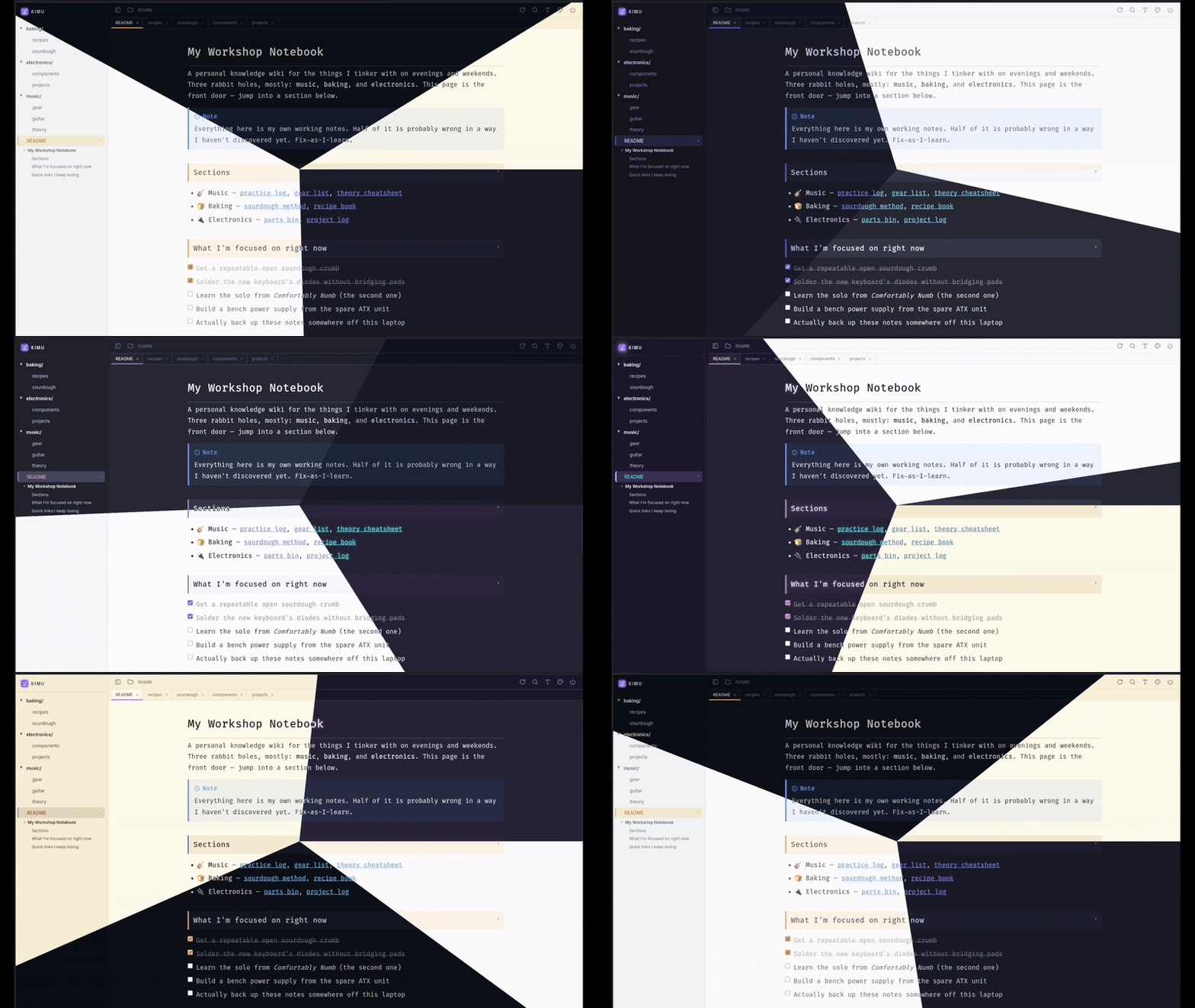
Let me tell you how I made this showcase, maybe you'll find inspiration for your next project: I took 7 screenshots in the same position but with different themes, and then I tried to describe the effect to Gemini so it would build a quick JS script to show the images. I recorded it with OBS, edited it with DaVinci Resolve so it would loop perfectly, and finally turned it into a gif using ffmpeg. I really like the effect, but what I liked most was that going from idea to result took me like 15 minutes, between Agents and wiring things together by hand. The effect is much prettier if you clone the project and open the index.html file I linked above, so you can see it at a glorious <many> FPS, instead of that gif compressed to 15 FPS and full of artifacts.
Future work #
I think Kimu is almost finished. If you have suggestions, I'll gladly read them, but I really like how Kimu is right now.
Some things I've been thinking about, and will probably end up building, in no particular order:
- Easier installation
- Inline text editing, with a minimal toolbar
- Probably more fonts
And that's it.
Thanks for reading.